Jewely Knowledge Base
Dashboard – Jewely ERP
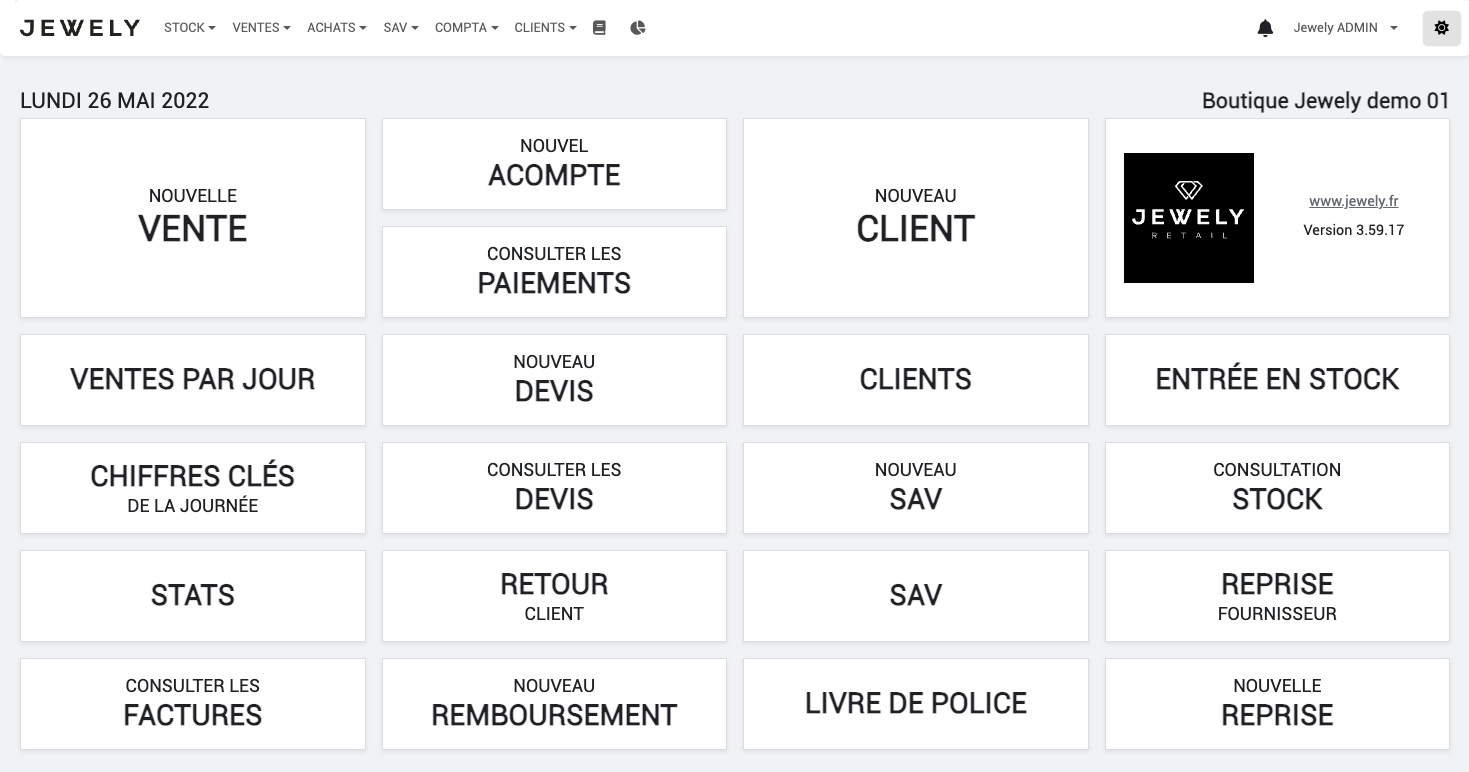
The Jewely ERP dashboard is the software's gateway. Designed to offer intuitive and fast navigation, it allows jewelry and watch stores to easily access the essential functions of their business. Thanks to its functional block organization and fluid interface, the user can manage their daily operations in just a few clicks.
Dashboard – Jewely ERP
📅 Sales
- New sale : Start a customer transaction instantly.
- Today's Sales : View all sales made during the day.
- Key figures : Synthetic display of turnover, number of sales and margin.
- Statistics : Access to global sales analyses (by period, by product, etc.).
- Customer feedback : Register a returned product.
- Refund : Create a partial or full refund.
💳 Payments & Billing
- New deposit : Record a partial payment.
- Payment consultation : Access the settlement history.
- Invoice management : Find and administer all issued invoices.
👥 Customers
- New customer : Quickly create a customer file.
- Customer management : Access the entire customer file.
- New quote : Develop a personalized quote.
- Consultation of quotes : Access all quotes established.
🛠️ After-Sales Service (SAV)
- New request : Create an intervention sheet for after-sales service.
- After-sales service monitoring : View all after-sales service requests (active or completed).
📦 Stock
- Entering stock : Add new products to stock.
- Consultation : View and filter all items in stock.
🔁 Recovery
- Return to supplier : Record the return of a product to a supplier.
- New recovery : Manage the purchase of a used product.
📚 Police Book
- Official register : Access regulated monitoring of product movements.